Loading
Operations kanban
Every quote in flight — on one drag-to-advance board.
Most shops run the day from a whiteboard, a notebook, and a manager's head. The Workflow board replaces that with a single quote-based Kanban: every quote lives in a column, columns are fully customizable per shop (rename, recolor, add, mark terminal), and dragging a card into a terminal column automatically sets that quote's status to Approved. A separate Unassigned lane holds quotes with no column yet, and a read-only Online Bookings lane shows new public-booking-page appointments that haven't been checked in.
- 6 default columns on signup — New Leads, Quoted, Follow Up, Scheduled, In Progress, Completed
- Drag-to-advance — moves the quote to a different column
- Dropping a quote in a terminal column auto-sets its status to Approved
- Pipeline / Projected / Collected value rollups + active-quote count
- Unassigned lane for quotes with no column yet
- Read-only Online Bookings lane — new public-booking-page appointments not yet checked in
What this looks like in a shop
Illustrative scenario. A shop manager opens the Workflow board Monday morning. New Leads has a handful of inquiries; Follow Up has quotes sent Friday with no reply. She drags two into Scheduled after confirming by phone — that's a column change only, no automatic message fires from the board itself (the calendar booking, if any, is what sends the confirmation text). By afternoon a few jobs land in Completed, which auto-approves those quotes.
Workflow board
Quote pipeline · fully customizable columns · drag to advance
Pipeline
$19.7k
Projected
$4.2k
Collected
$5.9k
Active quotes
18
New Leads
Q-3021$612
TB
Tasha B.2024 Model Y
Draft1h
Q-3019$329
OR
Owen R.2022 GR86
Draft3h
Quoted
Q-3012$879
MR
Miguel R.2022 F-150
Sent1d
Follow Up
Q-2998$449
JP
Jenna P.2024 CR-V
Sent2d
Scheduled
Q-2984$971
PM
Priya M.2023 CX-5
ApprovedThu 9a
In Progress
Q-2971$529
DB
Devon B.2022 GR86
$200 due
Approved2h
Completed
Q-2960$1,039
ML
Marcus L.2019 M3
Paid
Converted6h
Workflow board — quotes, fully customizable columns
Customer CRM
Every customer, vehicle, and history in one place.
Your shop's five-year memory, in one searchable place. Every customer, every vehicle they've owned, every appointment you've done, every quote, every payment, every photo, every SMS — threaded into a single timeline that loads the second someone walks in the door. Search by plate, VIN, phone, or a guess at the name. No more spreadsheets, no more paper folders, no more asking the tech if you've done this car before. The record stays clean because the product forces it to.
- Unlimited customers on every plan — never archived, never charged per-contact
- Multi-vehicle per customer; co-ownership and household links
- Notes, tags, and VIP / referral-source / fleet / do-not-book labels
- Marketing opt-in / opt-out per channel (SMS, email, push) — TCPA-ready
- Soft-deleted records kept 90 days (accidental deletes are recoverable)
- Per-customer portal link — they see their own quotes, invoices, warranties
What this looks like in a shop
Jessica rolls into the shop in a blacked-out G-Wagen. You punch in 'BLK4U' — the plate pops right up. You see she was in 18 months ago for ceramic, there's a scratch she noted last time, her phone is on file, and she's tagged 'VIP Referral Source.' Your install quote loads with her preferred film brand pre-selected.
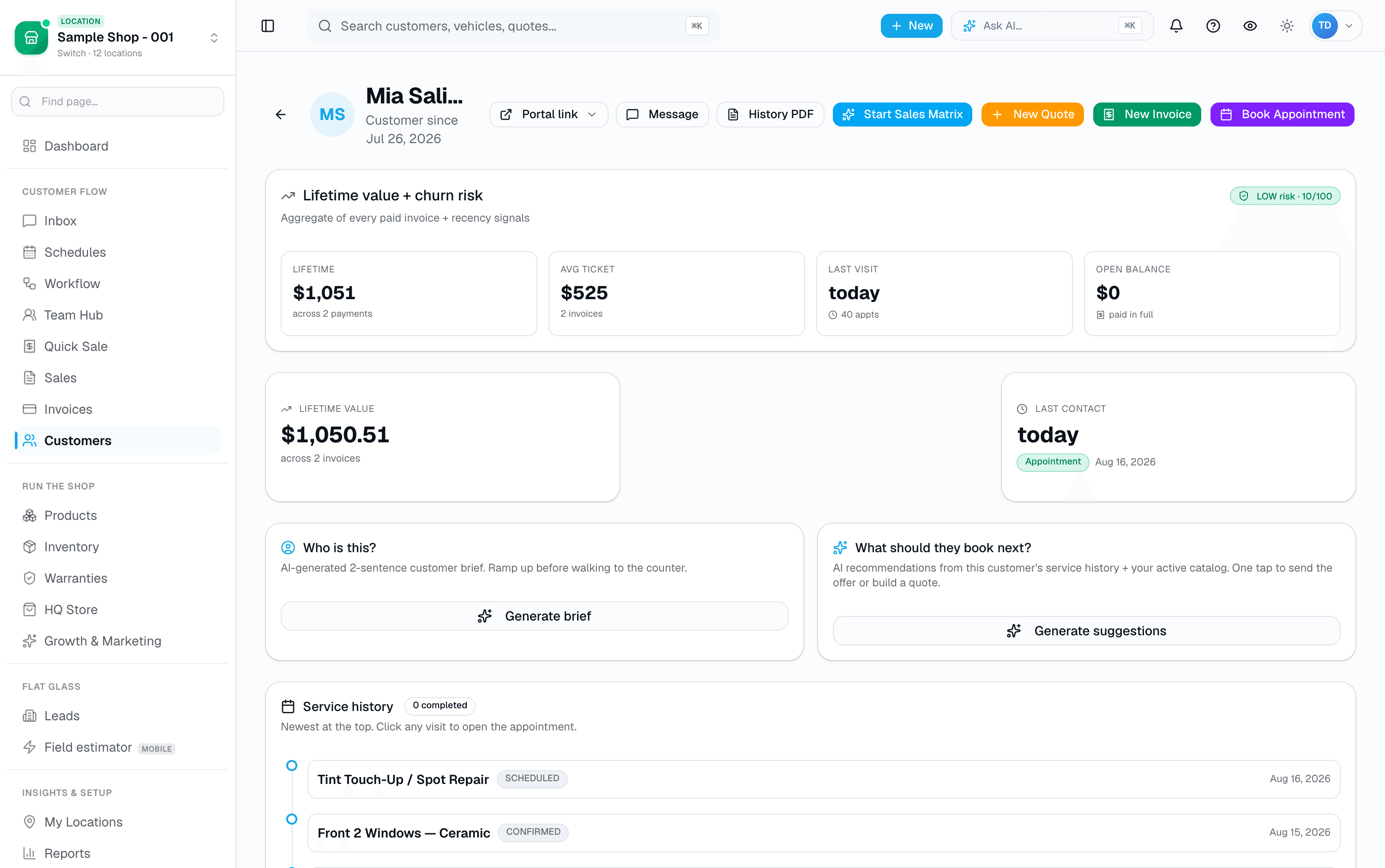
Customer profile
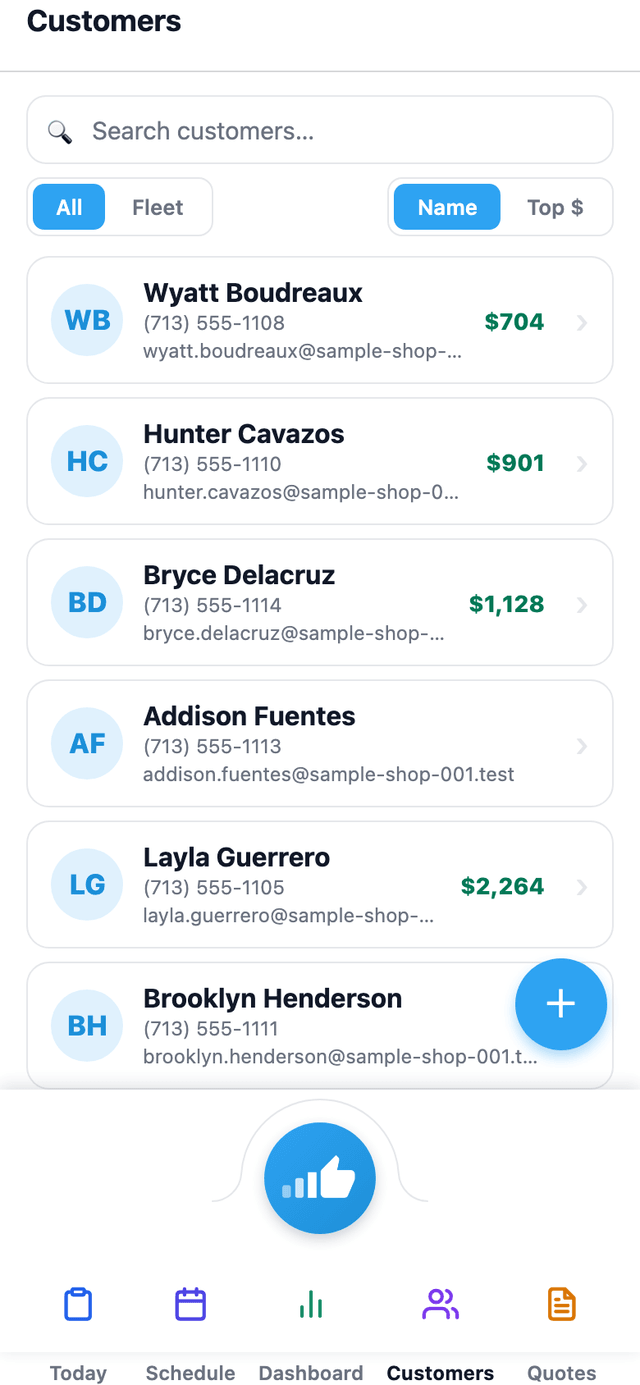
Also on mobile
The mobile app's Customers tab lists every customer with lifetime value at a glance — the same CRM data as the web app, in your pocket.
Scheduling & Calendar
The calendar your shop actually runs on.
A shared calendar every installer and bay assignment pulls from, in day, week, and month views. Drag a card to a new day in week view and it moves — a drag or an online booking that double-books a bay is blocked outright, and adding a new appointment by hand flags the conflict and lets you confirm an override. Confirmations, reminders, and no-show follow-up texts go out on their own. Opens online booking to your customers without opening a scheduling hole.
- Day, week, and month views
- Every appointment shows its assigned installer or bay
- Filter by installer/bay from the calendar toolbar
- Jump to any date with Today / prev / next
- Dark mode that works in a bright shop
What this looks like in a shop
Saturday is chaos at most shops. A customer calls wanting a PPF install on Friday. Open the calendar — day view lists everything scheduled, each row colored by which installer or bay it's assigned to. Book the new appointment against an open installer, and their confirmation text goes out right away. If a Friday job needs to move, drag it to a different day in week view; the assigned bay's conflict check blocks it if that slot's already taken.
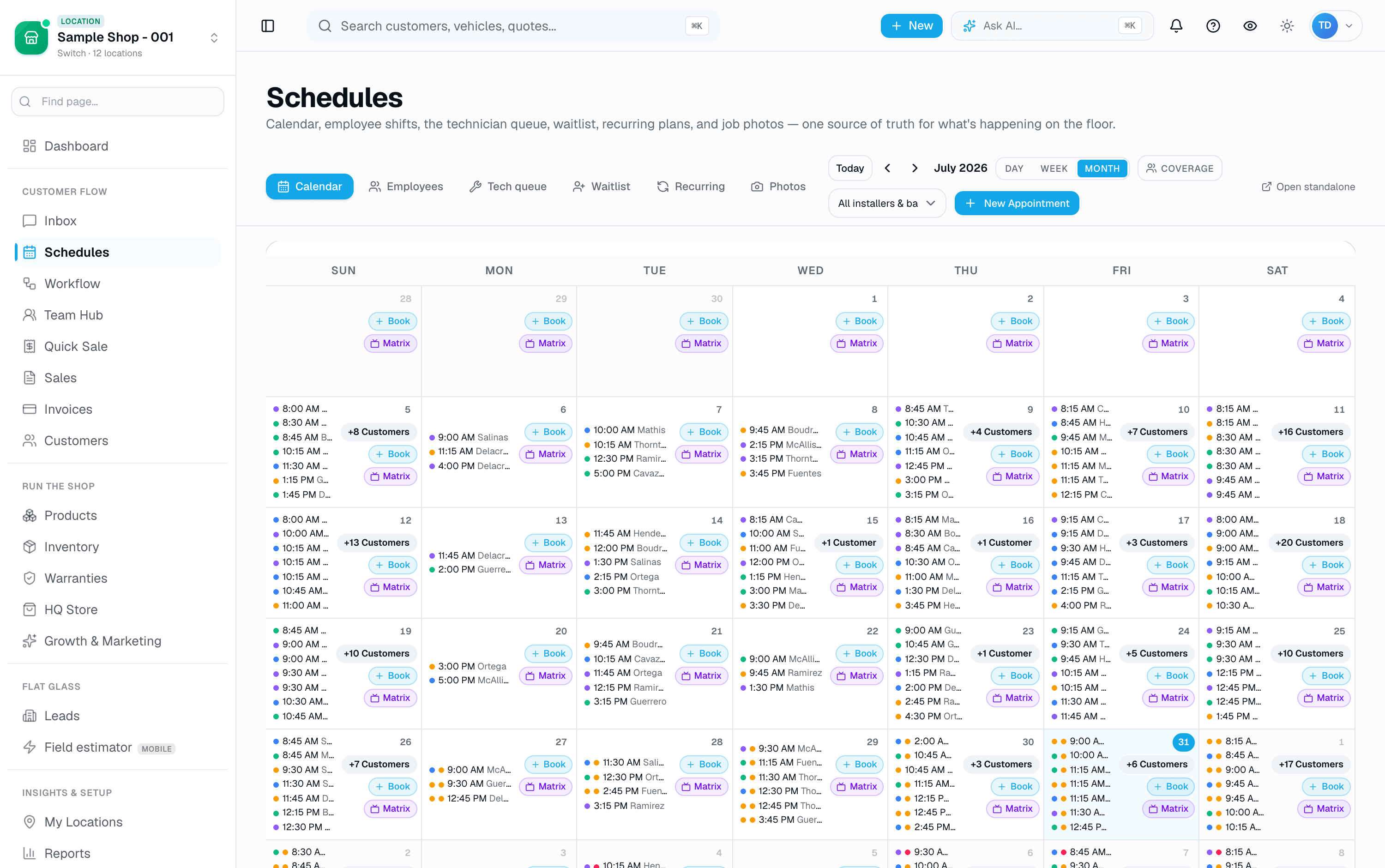
Month view
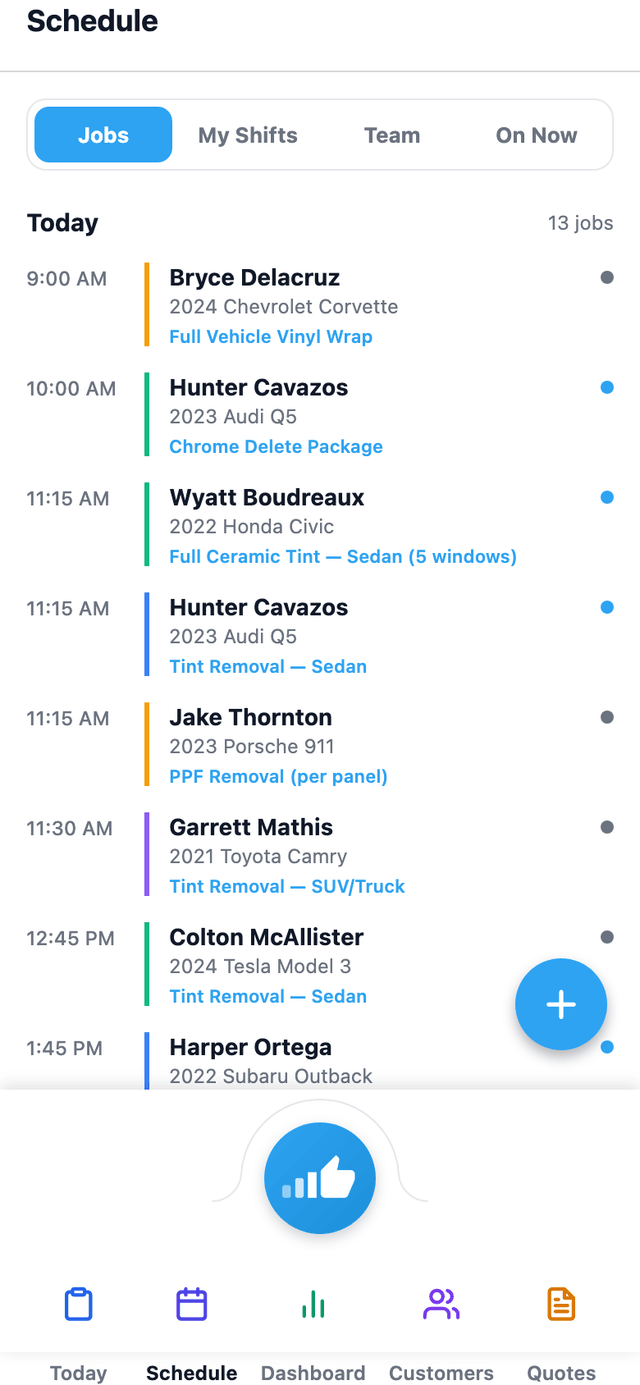
Also on mobile
The mobile app's Schedule tab shows the team schedule — jobs, shifts, and who's on now — for whoever's on the floor.
Quotes & Estimates
One clean quote. Line items, e-signature, a deposit link.
The strongest quote is one the customer can read on their phone and approve with a signature. SalesThumb turns a price conversation into a signed commitment and a paid deposit in a couple of minutes — while you're still on the call. Every quote is one fixed set of line items (services, film, parts, fees, discounts) with one total; there's no separate customer-facing tier picker — if you want to offer a customer a choice, you send them the quote you want them to pick, built with the film tier (Good/Better/Best) you and the customer already agreed on.
- Line items: services, film, parts, fees, discounts, add-ons
- Guided window-tint picker: tap a window, pick a Good/Better/Best film tier + VLT shade, priced against your catalog
- Reusable templates (name/description/optional vehicle-class tag) loaded manually from a search popover
- AI quote-suggest: describe the job in plain English, get pre-filled line items
- Draft auto-saves to your browser as you type (not shown as a live counter)
- Contract pricing overrides: a standing flat price or % off for fleet, dealer-group, and VIP accounts, set once in Settings → Fleet Pricing and applied automatically on every future quote
What this looks like in a shop
Your phone rings: 'What's a full ceramic tint on a Model Y?' You open a new quote, tap 'Add window tint,' and paint the Better tier across the full 7 windows — it prices off your catalog automatically. Send. Two minutes later she signs on her phone and pays the deposit — she's booked while you're still on the call.
New quote · Priya M.
Draft
Vehicle
2023 Mazda CX-5 Signature
SUV · plate 8RKJ291
Add window tint
Opens a per-window picker — tap a window, choose Good / Better / Best + a VLT shade for that window only.
WindshieldFront · LFront · RRear · LRear · RBack glass
Active shade
5%20%35%50%70%
Line items
AddItemQtyUnitTotal
Ceramic IR · Front 21$249$249
Ceramic IR · Rear 51$449$449
Windshield · 80% ceramic1$139$139
Old film removal1$60$60
Subtotal$897.00
Tax (8.25%)$74.00
Deposit required (30%)$291.30
Total$971.00
Quote builder
Also on mobile
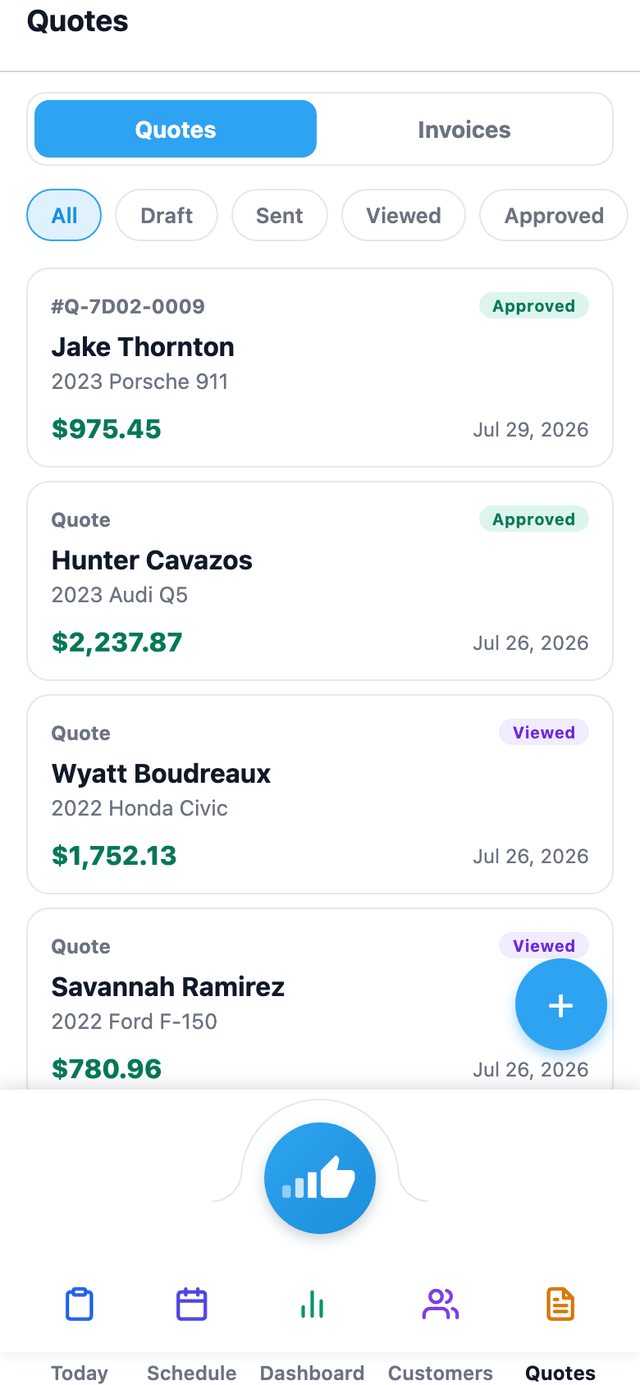
The mobile app's Quotes tab shows quotes and invoices with status badges — sales staff can check status without opening a laptop.
Invoices & Billing
Invoices your customer actually reads.
Invoicing in SalesThumb is a one-tap transition from job-done to money-in. Convert any approved quote to a branded invoice, adjust if scope changed, and send a pay link over SMS or email. Your customer opens it on their phone, pays by card, and the invoice ties back to the quote, the deposit, and the appointment. Paid invoices push one-way into QuickBooks Online with a tap, the matching customer created automatically. No more Venmoing yourself from the customer's iPhone while the install waits. You do the work, we collect the money, your paid invoices land in QuickBooks.
- One-click quote → invoice (deposits carry, line items lock, number increments)
- Line items with per-line tax, unit price, quantity, discount
- Auto-numbered per shop, gap-free series
- Custom due-date rules (Due on receipt, Net 7, Net 30)
What this looks like in a shop
You finish a $1,200 ceramic coating. The quote was approved two weeks ago with a $200 deposit. You tap Convert → the invoice appears pre-populated with the quote lines and $200 already credited. Balance due: $1,000. Text the pay link. She taps to pay. Push it to QuickBooks with a click.
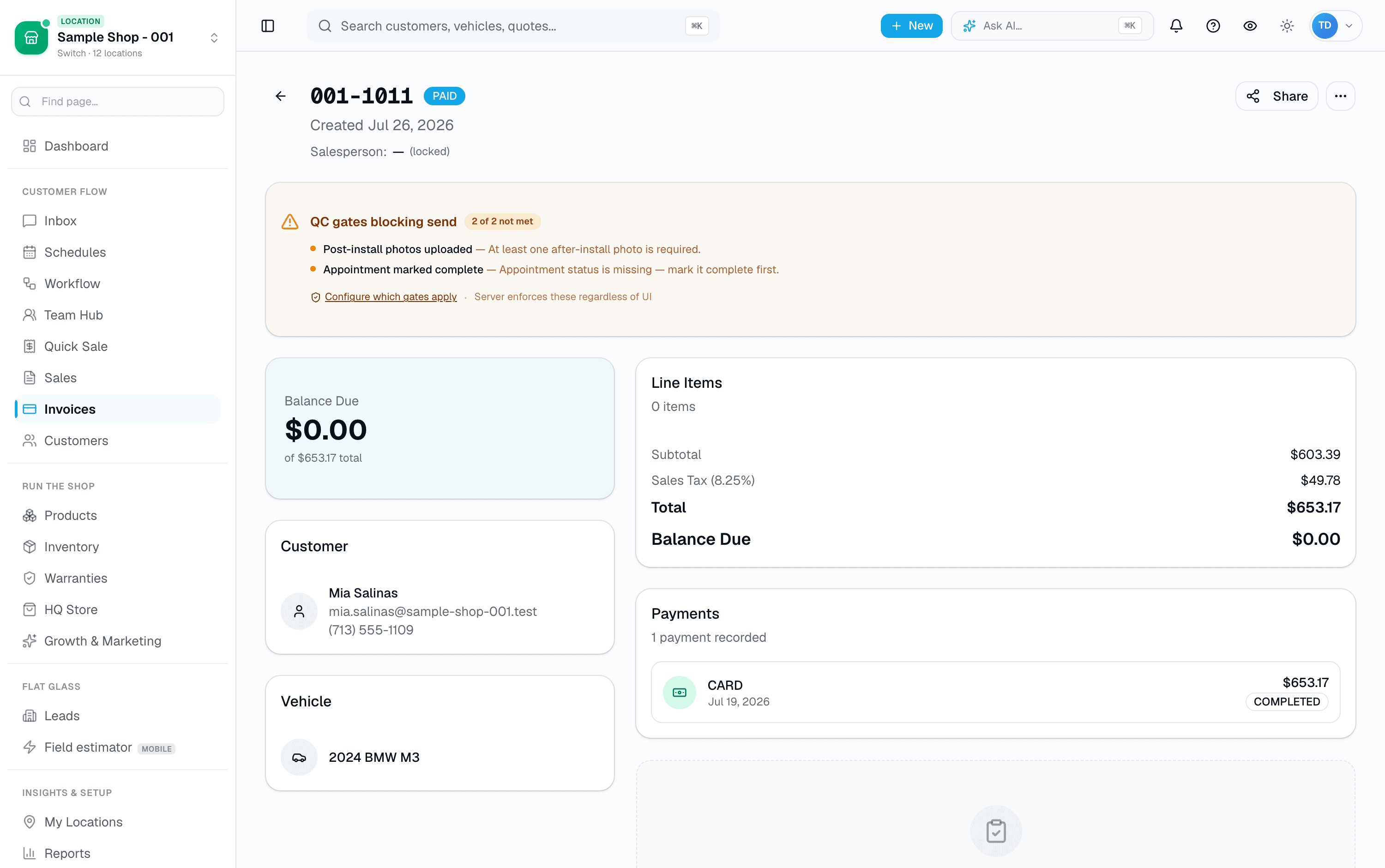
Invoice editor
Online Payments
One connected processor, transparent fees.
Payments in SalesThumb ride on a single integrated payment processor, with one bundled all-in rate per tier — no separate processor-cost-plus-markup split. Pay links go out over SMS, open on the phone with card payment above the fold, and tap-through in a few seconds. Refunds, deposits, partial pays, and disputes all live in the app. Merchant onboarding is a short hosted application through the processor's own widget; funds settle on the processor's schedule, which SalesThumb doesn't configure. No Square terminal reconciliation. No Venmo screenshots. No "can you send me a text when it goes through?"
- Pay links over SMS + email with card payment above the fold
- ACH recorded as a manual payment method (like cash/check) — not a self-serve online ACH debit today
- Fast, no-login checkout on every pay-link page
- Tip capture on every card transaction (15/18/20% presets + custom)
- Cash, check, ACH, financing — manual entry by staff
What this looks like in a shop
Invoice goes out via text. Customer taps the pay link, pays by card in a few seconds. The payment is reconciled automatically against the invoice. No QuickBooks export. No Square dashboard. No sticky notes.
9:41●●●●Wi-Fi82
pay.salesthumb.com/INV-01310
S
Sample Shop LLC
INV-01310 · Priya M.
Balance due
$769.70
Deposit applied · $291.30
Pay by card
4242 4242 ····
04/28
CVC
Add a tip for Alex T.
15%
$115.50
18%
$138.55
20%
$154.00
No tip
Secure · PCI-DSSReceipt · texted
Pay link (mobile)
Film Roll & Inventory
Film roll tracking that actually knows what's on the shelf.
Inventory is the most painful process in a tint or PPF shop — and the one every other SaaS gets wrong. SalesThumb tracks rolls the way you actually use them: by length remaining, by batch, by the installer that cut from them, linked to the appointment they went into. Receive a shipment, log it, and go. Deduct on job close. When a roll dips below your threshold, you get the alert before you're mid-install asking the customer to wait. Log the batch and lot number when you receive the roll, and if a warranty question comes up later you can look up exactly which roll and batch went into a job — right in your inventory records.
- Rolls: track by remaining inches (tint / PPF / wrap)
- Bottles: track by remaining ounces (ceramic / sealant / compound)
- Batch + lot numbers on every unit
- Multi-location: rolls live at a specific shop, not a generic pool
- Shelf-to-shelf transfer log (who moved what, when)
What this looks like in a shop
Friday morning you pull a tint roll off the shelf, open the roll's page, and see 240" remaining. You install a sedan (uses 68"), record the usage, and the roll updates to 172". When a roll crosses its reorder threshold, it shows up on the low-stock view so you catch it before you're stuck mid-install.
Inventory · Film rolls
142 active · Sample Shop LLC
SKU, lot…
Active rolls
142
Inventory value
$48,210
Below threshold
8
Below thresholdAll brandsTintPPFCeramic
SKU · lotRemainingCostStatus
XPEL Prime XR 70
lot X24-0912-A · received Apr 2
$612Out42in · 4%
3M Ceramic IR 35
lot 3M-14-B · received Mar 28
$548Low118in · 10%
Glacier Ceramic Plus 20
lot ST-208-A · received Mar 31
$498Low184in · 15%
XPEL Ultimate Plus
lot X24-0812-C · received Apr 8
$1,840OK612in · 43%
Glacier Premium Ceramic 30
lot LL-4412-B · received Apr 11
$488OK724in · 60%
3M Crystalline 70
lot 3M-88-A · received Apr 14
$648OK892in · 74%
Rayno Phantom S9
lot RY-212-A · received Apr 16
$582Fresh1124in · 94%
Rolls overview
Warranty Certificates & Claims
Branded warranty certificates. Tracked claims. Happier customers.
Warranty is the one feature every shop either ignores or does badly on paper. SalesThumb generates a certificate PDF for any completed install — a staff member registers it in a couple clicks, picking one of your saved coverage tiers if you've set them up — with a QR code linking to a public verify page. Customers can file a claim right from that page with nothing but the certificate number. A claim lands in your inbox with the install details already attached — no email chain asking what kind of film they have.
- Staff registers the warranty from the appointment page — not automatic on job completion, optionally against a saved coverage tier
- Install fields: film/windows description, installer name, install date, warranty period
- Real QR code + link to a public verify page (app.salesthumb.com/warranty/{certNumber})
- Generic PDF template — no shop logo or brand-color customization today
- Multi-tier coverage: one certificate can reference tint + PPF + ceramic tiers
What this looks like in a shop
Illustrative scenario. A customer had ceramic tint installed 2 years ago and notices a bubble. She finds her certificate number, opens app.salesthumb.com/warranty/WR-20260420-7HKQ3M9XZP — no login needed — and files a claim: name, email, phone, 'Bubbling,' and a short description. The shop sees it in their claims inbox with the install details already attached and marks it Approved after a quick look.
Certificate #WR-20260420-7HKQ3M9XZP
Priya Menon · 2023 Mazda CX-5 · registered manually Apr 20, 2026
CERTIFICATE
of Warranty
This certifies that the window film installation performed by Sample Shop LLC for:
Priya Menon
is warranted against bubbling, peeling, cracking, and color change for the period specified below, when installed according to manufacturer specifications.
Vehicle2023 Mazda CX-5
FilmXPEL Prime XR Plus 70
WindowsFull 7 — all windows
InstalledApril 20, 2026
Warranty periodLifetime
InstallerAlex P.
Certificate #WR-20260420-7HKQ3M9XZP
Verify online
salesthumb.com/warranty/WR-20260420-7HKQ3M9XZP
Sample Shop LLC · (512) 555-0199 · hello@sampleshop.example
Delivered: email (manual send, requires an email on file)
RegisteredCertificate PDF
Also on mobile
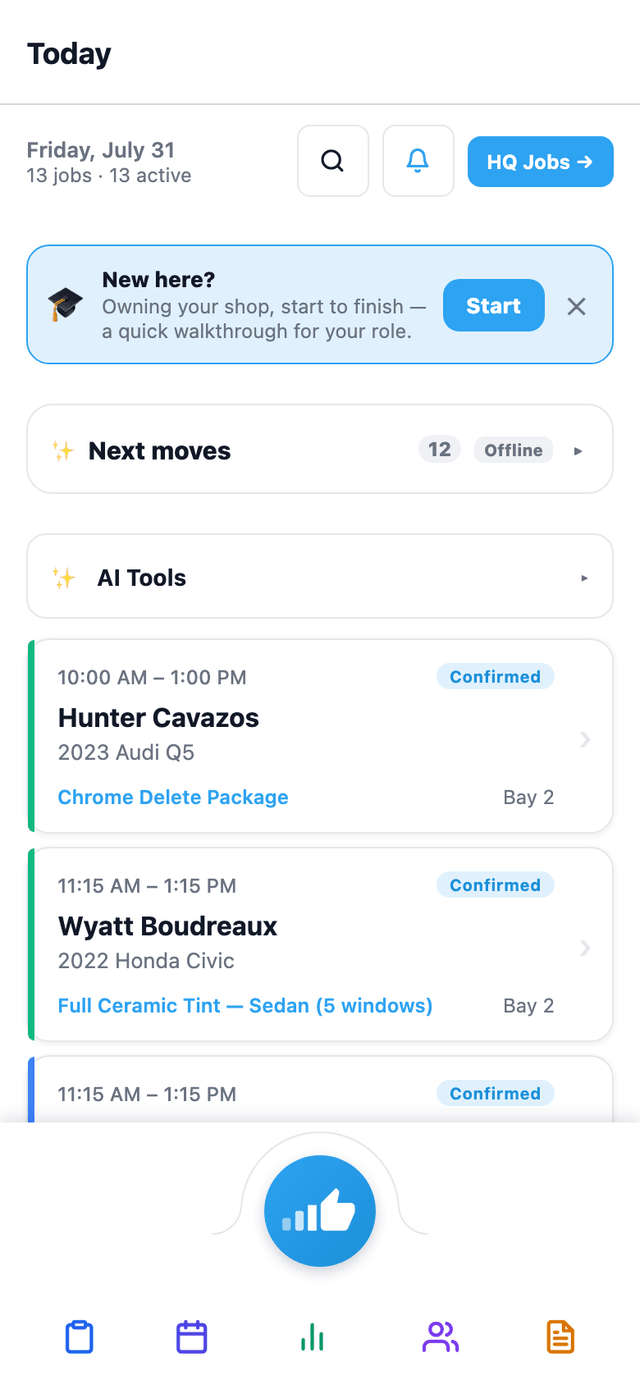
Warranty Triage — assess a claim — is one of the AI Tools shortcuts on the mobile app's Today screen, alongside Photo → Quote and Install QC.
Reports & Analytics
76 real reports. No single all-in-one dashboard.
Reports at SalesThumb is a sidebar of 76 individual report views grouped by category (Financial, Sales, Operations, Staff, Customers, and more) — you open the one you want, not a single curated homepage with everything on it. Two daily emails land in your inbox automatically: a revenue recap (yesterday's revenue, quotes sent, accept rate, 7-day trend) and a morning standup (today's appointments, urgent inbox count, AR aging). Most reports export to CSV on demand. What's genuinely useful here is real and specific — profit-per-job from material cost, a quote-to-invoice funnel, per-installer revenue and clock efficiency — we'd rather tell you exactly what each one covers than promise a single dashboard that doesn't exist.
- Revenue overview, daily revenue, payment methods, sales tax, AR aging, discounts, YoY, end-of-day close
- Close-rate funnel: quotes sent / approved / converted / declined / expired, appointments booked/completed
- Gross profit per job — revenue minus material (film) cost only
- Top services, service mix
What this looks like in a shop
You open Reports and pick Gross Profit per Job: 58 completed jobs this month, $31k profit after material cost, one PPF job standing out at a thin 58% margin worth a second look. Separately, the 8am revenue-recap email already told you yesterday brought in $2,340 — you didn't have to open the app to know that.
Gross Profit per Job · 30d
Revenue (payments received) minus material cost only — no labor or processor-fee input
Last 30 days
Revenue · 30d
$38,124
Material cost
$6,842
Profit
$31,282
82%Jobs
58
Customer · serviceInstallerRevenueMaterialMargin
- Marco R.$769−$12883%
Priya M.
Full ceramic
- Jordan K.$1180−$22881%
Jason K.
Full + windshield
- Marco R.$1480−$21486%
Derek W.
Full + ceramic coat
- Alex P.$769−$18276%
Lisa P.
Full ceramic
- Marco R.$389−$6882%
Sara H.
Front 2 · ceramic
- Jordan K.$980−$41258%
Ken D.
PPF partial
Installer shown for context only — this report has no labor-cost input, so margin here reflects material cost, not total job cost.
Gross profit per job
Messaging cost control
A $100/mo wall between you and a runaway drip sequence.
Drip sequences and bulk blasts are powerful — and one mis-configured trigger can fire thousands of sends in an afternoon. The Messaging Spend Cap is the per-shop ceiling that stops that from becoming a surprise bill. Sends within your plan tier's included SMS/email allowance are free and don't touch the cap at all; once a shop goes over that allowance, every additional send — including automated reminders, not just drips and blasts — draws against a single monthly overage bucket, confirmed in code ("Every send path — drips, reminders, review requests, blasts, automation ticks, etc. — passes through this central gate"). Default cap is $100/mo of overage per shop. Hit it, new sends pause until you raise the cap in Settings → Payments or the month resets. For shops sending genuinely high volume, BYOC mode lets you bring your own Twilio + Resend credentials and skip the cap entirely — pay your carrier directly.
- $100/mo per-shop default cap on OVERAGE dollars, once you're past your tier's included SMS/email allowance
- Live usage bars + overage status in Settings → Payments
- In-page color warning at 75% of the cap, red at 100% — no push/email/Slack alert today, you see it when you open the page
- Applies to every send once you're over allowance, including automated reminders — not just drips and blasts
- Self-service raise up to $1,000/mo overage; above that needs a manual admin override
- BYOC escape hatch — bring your own Twilio + Resend, skip the cap, pay carriers direct
What this looks like in a shop
Illustrative scenario: a new tech at Sample Shop LLC accidentally wired a welcome drip to fire on every customer record instead of just new ones, well past the shop's included SMS allowance for the month. At roughly 1.5¢/segment overage, the queued batch would have added real cost on top of an already-elevated running spend. The cap stopped new sends once the overage total hit $100 for the month. Mike opened Settings → Payments, saw the cap maxed out with a red status, raised it to $200 for the rest of the month, and fixed the drip's trigger.
Settings · Payments
Messaging spend cap · billing period May 1 – May 31
Messaging spend cap
Resets in 8 daysBuilt-in quotas keep your monthly bill predictable. Hit the cap and overages roll up against a hard $100 ceiling — we never let a runaway loop drain your card.
SMS this month
74%1,847/ 2,500 segments
≈ 78 / day
Email this month
85%42,310/ 50,000 emails
≈ 1.7k / day
Overage so far this month
$14.20 / $100.00 cap
At current pace: $32.15 by month end
Bring your own Twilio + Resend
LiveSkip the spend cap entirely — connect your own carrier credentials and pay Twilio + Resend directly. We'll still handle send-rate limits and opt-outs.
twilioresendSettings → Integrations →
Spend cap section, Settings → Payments
Built-in staff training
New hire's first day: the app shows them where everything is.
Most software either dumps a new hire into an empty dashboard or hands them a PDF nobody reads past page one. SalesThumb's Training Wizard is built into the product itself: a role-matched set of short tours a technician, front-desk hire, manager, or HQ operator can start the moment they log in. Some steps just explain a screen; others spotlight a real button and don't advance until the person has actually clicked it. Progress is saved automatically, so a tour interrupted at step 3 picks back up at step 3 — not step 1 — whenever they return.
- 12 role-matched tours across 9 roles today — shop owner, manager, technician, front desk, service writer, HQ operator, franchise sales, org viewer, and super admin each see only the tours built for them
- Live spotlight, not a slideshow — "tour" steps highlight the actual UI element on the actual page, navigating there automatically if needed
- "Try it" steps require the real action — an "I did it" button advances the tour only after the person performs the step themselves; nothing is auto-detected
- Resumable — progress (current step, started/completed/skipped) is saved per person, so leaving mid-tour and coming back continues exactly where they left off
- Two entry points: a soft, dismissible banner that offers any not-yet-started tour on the pages it's relevant to, and a permanent /learn hub to start, reset, or skip any tour for your role at any time
- Steps can be gated to a specific permission — a step covering how to issue a refund only appears to someone who can actually issue refunds
What this looks like in a shop
Illustrative scenario: a shop hires a new technician who logs in for the first time and sees a small banner offering the Technician tour. She starts it — a few intro cards on what her role can see, then a "tour" step spotlights the calendar and walks her through today's jobs, then a "try it" step has her actually open a real job and mark a status change before the tour advances. She gets pulled away mid-tour for an install; when she comes back that evening, /learn shows the tour exactly where she left it. She finishes it over her first two shifts instead of one overwhelming session.
Every tour for your role, grouped and progress-tracked, with Continue / Reset / Skip on each one. The manual entry point alongside the dismissible banner nudge.
The /learn hub
More in run your shop
Supporting tools that round out the pillar.
Purchase orders + vendors
1-click POs from low-stock list, vendor catalog, receive-against-PO flow. Receive partial shipments with bulk-edit grid.
Installer leaderboard + commissions
Every job is credited to the installer or bay it's assigned to. Leaderboard, commission entries, payout tracking — installers see their own earnings tab.
Yearly tax filing pack PDF
One PDF with total revenue, sales tax collected, tips, and refunds — broken down by month and by payment method — ready to hand to your accountant.
State tint-law compliance + waivers
Every state's window-tint VLT limits built in. The quote builder flags front/back/windshield darkness that's over the legal limit and captures a signed customer waiver before the install — your legal cover, on file with the job.
QuickBooks invoice push
Connect QuickBooks Online and push paid invoices one-way to your books — the matching customer is created automatically. No month-end CSV export marathon for the accountant. (Two-way sync is on the roadmap.)
Staff time clock + PIN kiosk
Staff clock in and out from the app or a PIN-based front-desk tablet. Hours roll into payroll-ready timesheets your accountant can run straight off.
Other pillars
The full feature taxonomy.
The moat
AI built in
15 features
What your customers see
Customer experience
16 features
All-in-one Expo app
Mobile app
8 features
Drive demand · fill the calendar
Growth
8 features
Run 2 to 200 shops · franchise-grade
Multi-location & franchise
11 features
Franchise development · pre-award
Franchise Sales
6 features